SparkLAN WX-7800A / Tonze AW-6660 and OpenWRT
added: 2010-11-25
Overview
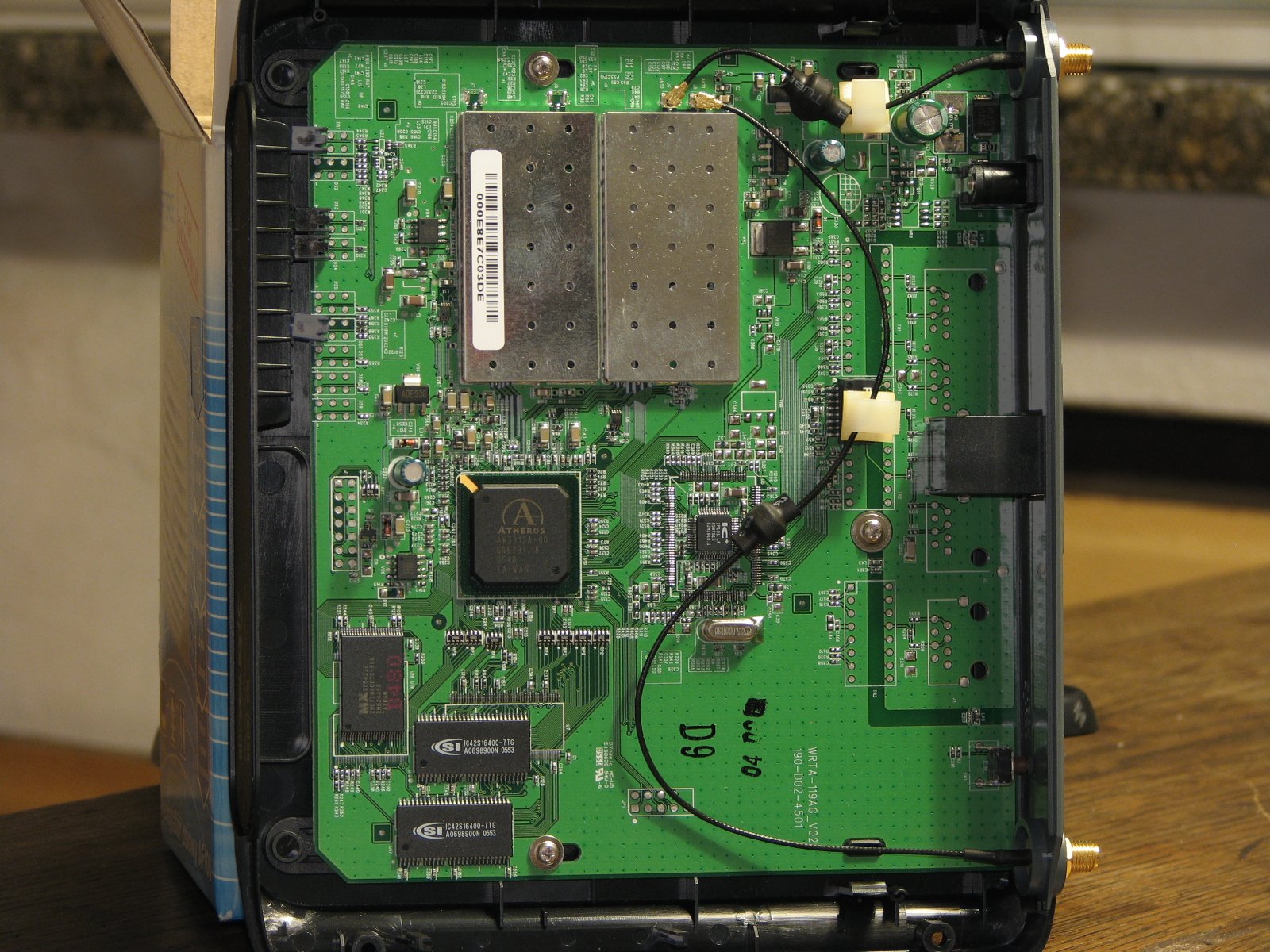
SparkLAN WX-7800A and Tonze AW-6660 are dual-band routers based on Atheros WiSOC 5312 chipset and have one ethernet port installed onboard. I have several of these devices for testing and below you can find all information about it which I was able to find/figure out.There are two versions of these devices: with 2M and 4M flash size. Original firmware is based on VxWorks RTOS by Wind River Systems. Besides original firmware there are also two commercial alternative firmwares available (applicable only for 4M flash version): OSWave and DD-WRT. I am also able to run OpenWRT on it.
According to OpenWRT wiki the boards internally identical are:
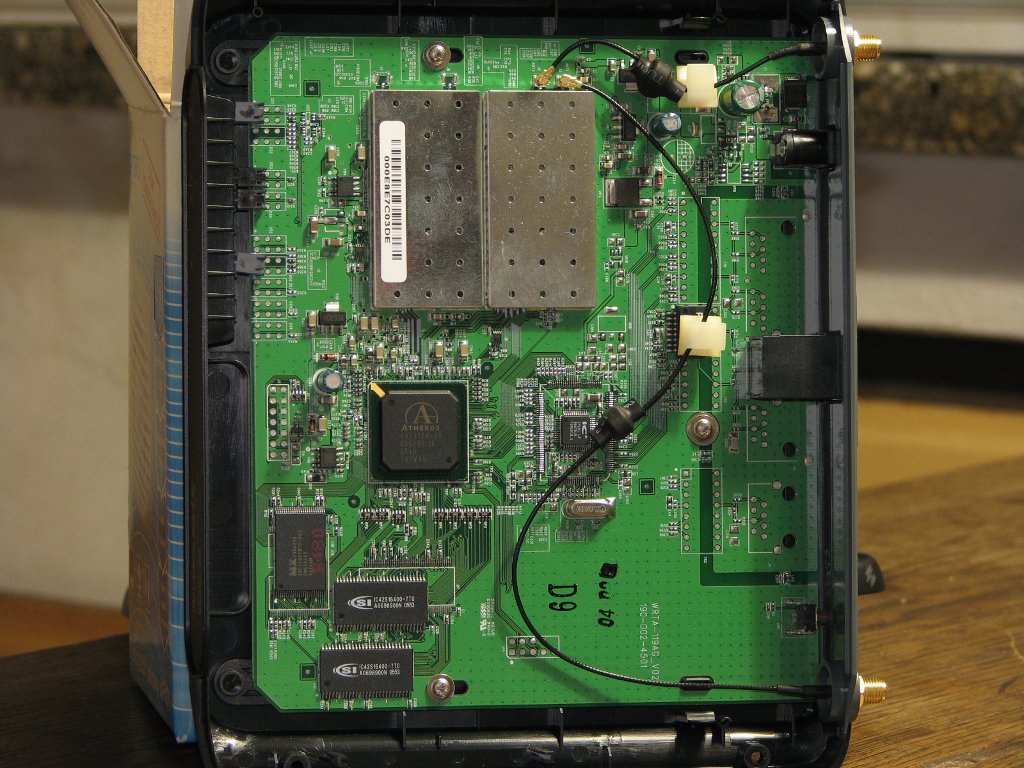
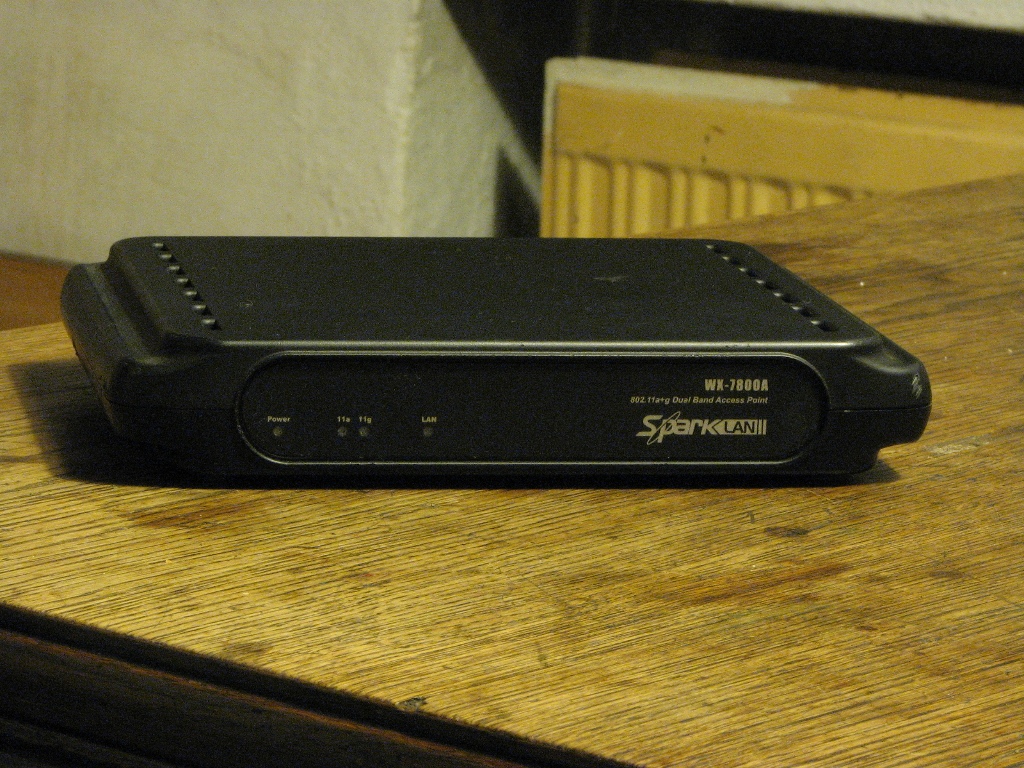
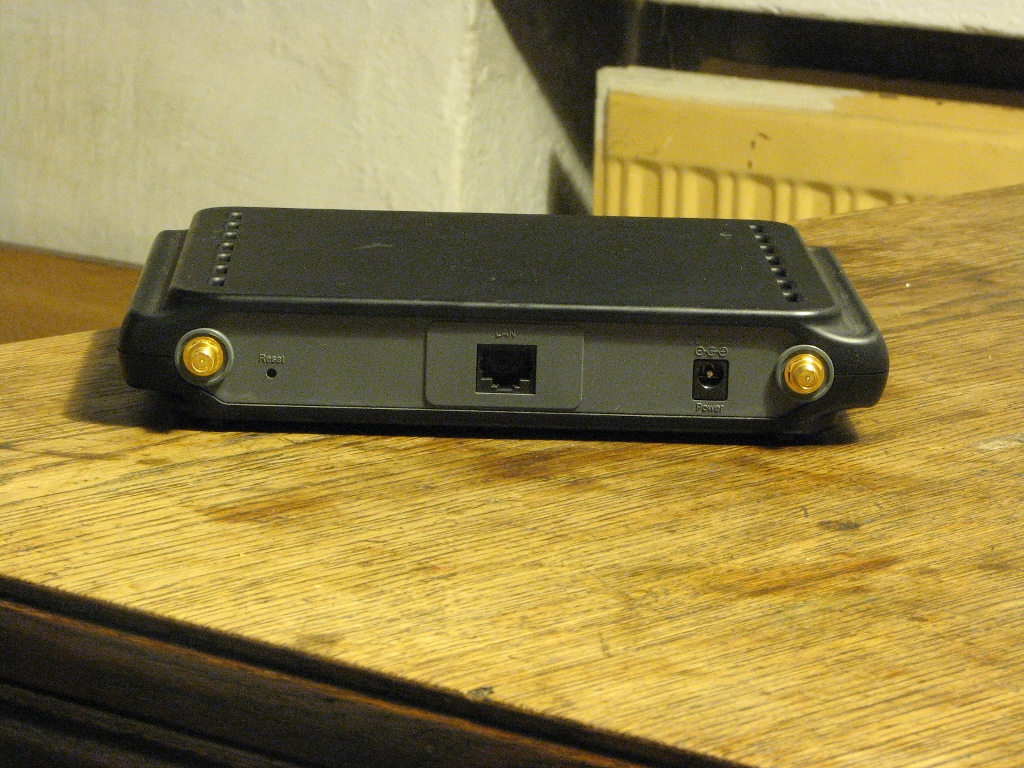
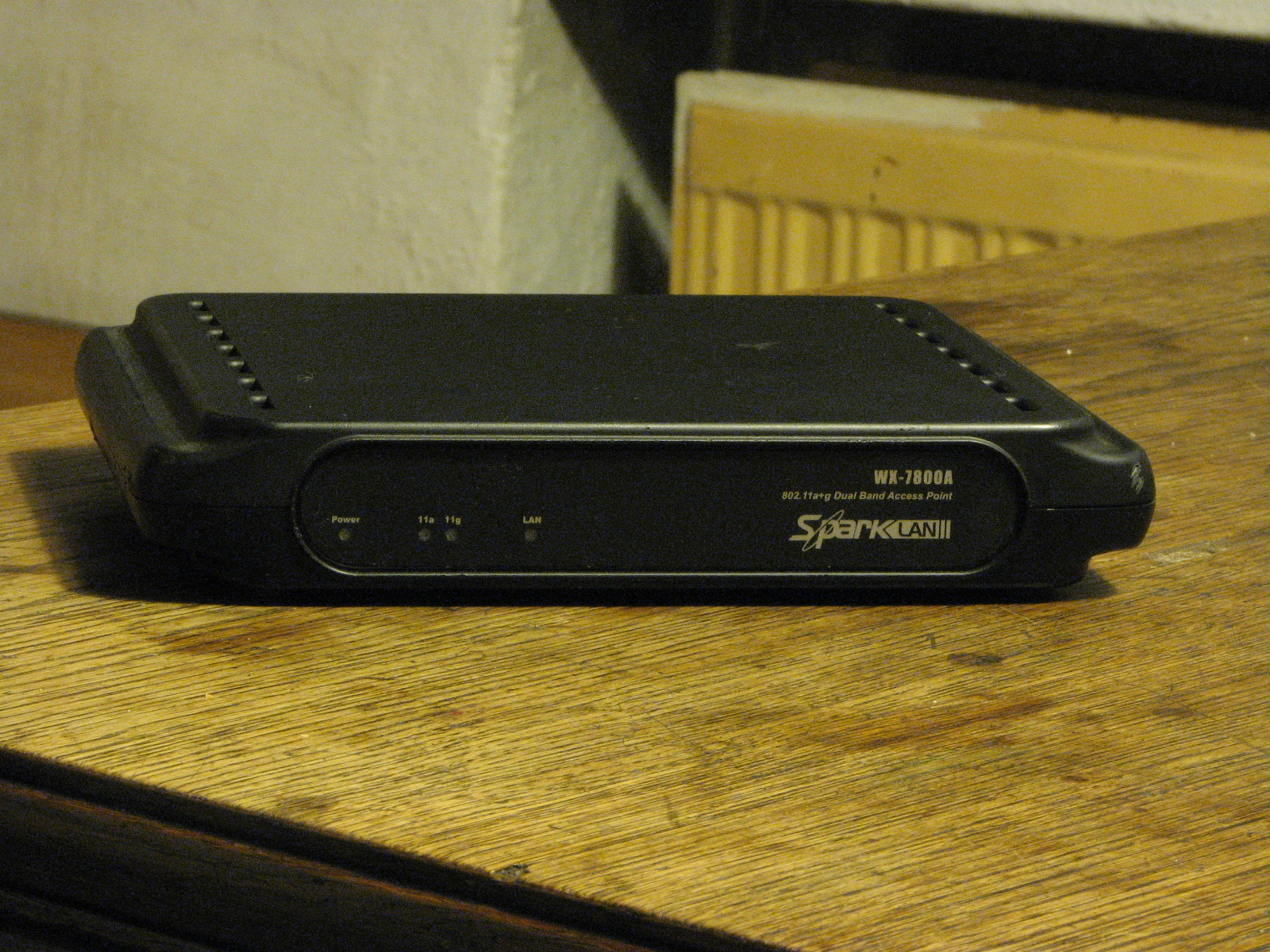
Some photos of my SparkLAN WX-7800A:
 bigger size (1024 x 768) original camera size (large) |
 bigger size (1024 x 768) original camera size (large) |
 bigger size (1024 x 768) original camera size (large) |

Preparing and connecting serial console adapter
When you want to do something more with the device you would need a serial connection. The serial port pads are available on board. Below is the pinout: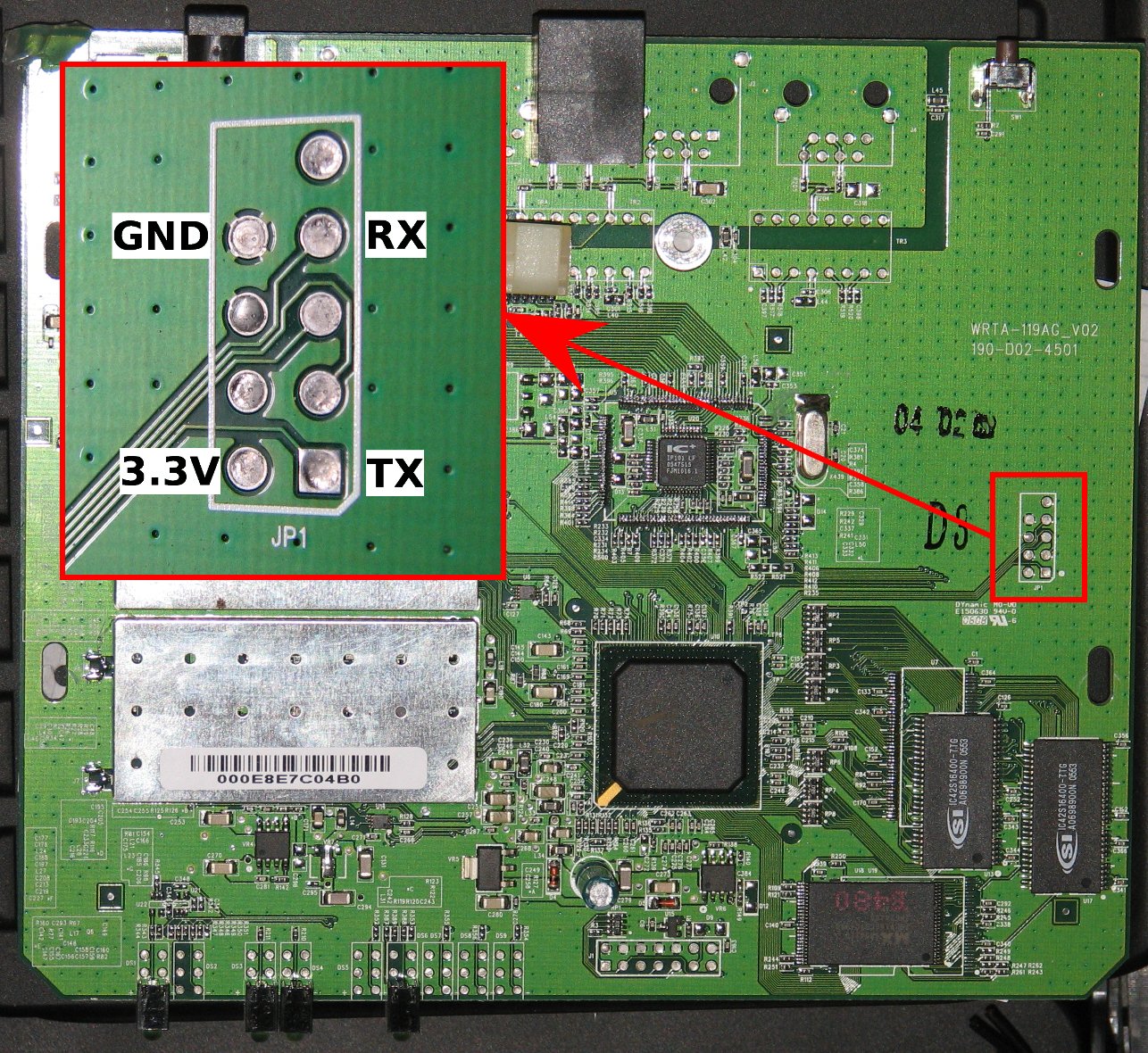 click for a bigger size |
The signal levels are 3.3V TTL - so if you're connecting it to the serial port in PC you need a voltage level converter.
Below is example schematic of such adapter:
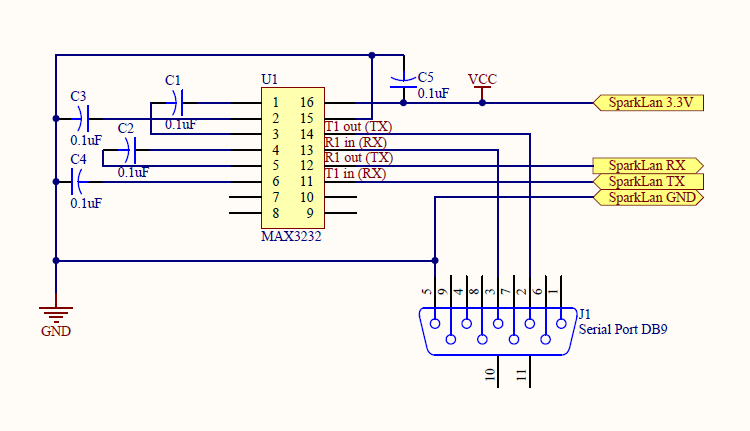
PDF schematic: AP_console_to_RS232.pdf
Above schematic is for MAX3232 which is flexible and can be powered with 3.3V.
If you don't have the MAX3232 and/or 0.1uF electrolytics capacitors (my case) you can use MAX232 instead, but you need to correct three things (according above schematic):
1. power it with 5V (eg. red wire from molex plug)
2. use 1uF capacitors
3. put several (in my case four) rectifier diodes on line which is going from MAX232 TX to SparkLAN RX.
Every diode is lowering down voltage by about 0.7V - so in this way the SparkLAN have something near 3.3V as logic one instead of 5V on RX line and it works for me.
Configuring original VxWorks bootloader for TFTP boot
To user serial adapter with original bootloader you need to set 9600 8N1 for serial port parameters.After powering device up I've got the following info:
ar531x rev 0x00005742 firmware startup...
SDRAM TEST SKIPPED


Atheros AR5001AP default version 4.0.0.48
Bootloader version 1.01


 1
 0
auto-booting...
After this the device is booting original firmware. So I need to press ESC key during countdown and then I was at the boot prompt:
[Boot]:Entering a question mark gives all available options:
[Boot]: ?

 ?                     - print this list
 @                     - boot (load and go)
 p                     - print boot params
 c                     - change boot params
 e                     - print fatal exception
 v                     - print version
 B                     - change board data
 S                     - show board data
 n netif               - print network interface device address
 $dev(0,procnum)host:/file h=# e=# b=# g=# u=usr [pw=passwd] f=#
                           tn=targetname s=script o=other
 boot device: tffs=drive,removable     file name: /tffs0/vxWorks
 Boot flags:
   0x02  - load local system symbols
   0x04  - don't autoboot
   0x08  - quick autoboot (no countdown)
   0x20  - disable login security
   0x40  - use bootp to get boot parameters
   0x80  - use tftp to get boot image
   0x100 - use proxy arp

available boot devices:Enhanced Network Devices
 ae0 tffs
Let's see my board data:
[Boot]: S
name:     Atheros AR5001AP default
magic:    35333131
cksum:    0
rev:      5
major:    1
minor:    0
pciid:    0013
wlan0:    yes 00:0e:8e:7c:03:df
wlan1:    yes 00:0e:8e:7c:03:e0
enet0:    yes 00:0e:8e:7c:03:de
enet1:    no  ff:ff:ff:ff:ff:ff
uart0:    yes
sysled:   yes, gpio 7
factory:  yes, gpio 6
serclk:   internal
cpufreq:  calculated 220000000 Hz
sysfreq:  calculated 55000000 Hz
memcap:   disabled
watchdg:  enabled
Printing current boot parameters:
[Boot]: p

boot device          : tffs:
unit number          : 0
processor number     : 0
file name            : /fl/APIMG1
inet on ethernet (e) : 192.168.1.250:0xffffff00
flags (f)            : 0x0
other (o)            : ae
Below is how I configured the device to boot kernel from my TFTP server and how I change the addresses (what I've changed is marked red color):
[Boot]: c

'.' = clear field;  '-' = go to previous field;  ^D = quit

boot device          : tffs:0 ae0
processor number     : 0
host name            : tftpserver
file name            : /tftpboot/image /srv/tftp/spark
inet on ethernet (e) : 192.168.1.250:0xffffff00 10.1.0.10:0xffffff00
inet on backplane (b): 192.168.1.250 .
host inet (h)        : 192.168.1.250 10.1.0.1
gateway inet (g)     : 192.168.1.1 10.1.0.1
user (u)             :
ftp password (pw) (blank = use rsh):
flags (f)            : 0x0 0x80
target name (tn)     :
startup script (s)   :
other (o)            :
I copied ELF kernel image built with OpenWRT to TFTP server (in above case as: /srv/tftp/spark).
After this I was able to boot and see if everything is OK:
[Boot]: @
Attached TCP/IP interface to ae0.
Attaching network interface lo0... done.
Loading... 2388848
Starting at 0x80200320...

Linux version 2.6.26.5 (manio@draco) (gcc version 4.1.2) #2 Sat Nov 22 17:34:28 CET 2008
CPU revision is: 00018009 (MIPS 4Kc)
Determined physical RAM map:
 memory: 01000000 @ 00000000 (usable)
Success! My OpenWRT linux is booting :)
I was testing it on Kamikaze OpenWRT and 2MB flash Sparklan version. Last time I was also trying svn Backfire branch but something was broken (I don't have enough time to figure it out). If you want test something more than only loading a kernel you either need to compile kernel with filesystem as ramdisk target or use so called 'NFS root'. Second method is ideal for debuging and testing because the root filesystem is remotely mounted via Network File System (NFS), you have as much free space as on server filesystem and you have much more free RAM available when comparing to ramdisk method.
SparkyTemp: Temperature measure circuit based on DS1820
Inspired by Len Kos article: Temperature sensor for WRT54G 2.x, WRT54GS, WL-500gx with DS1820, I've decided to make something similar but on my SparkLAN, I called it SparkyTemp :)Here is the final schematic for my SparkyTemp adapter:
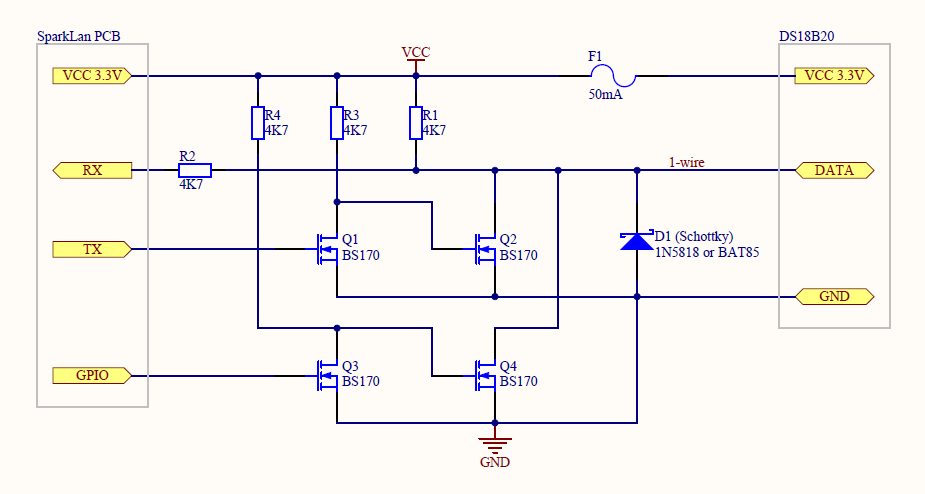
PDF schematic: SparkyTemp.pdf
First version (without using GPIO pin) works only when I connected this circuit after booting the device. After some time I've figured why:
The bootloader is sensitive for incoming serial port data. When there is something on RX line it prevents booting. I needed to alter my schematic by adding additional elements, so I've added Q3 and Q4 transistors to be able to "turn on" the circuit totaly by software. After some testing and measuring voltages on the PCB, I've decided to use GPIO #0 for this (there's a gpioctl tool in OpenWRT which can control the GPIO pins). I also soldered two pads to create bridge and solder one wire (see picture below):
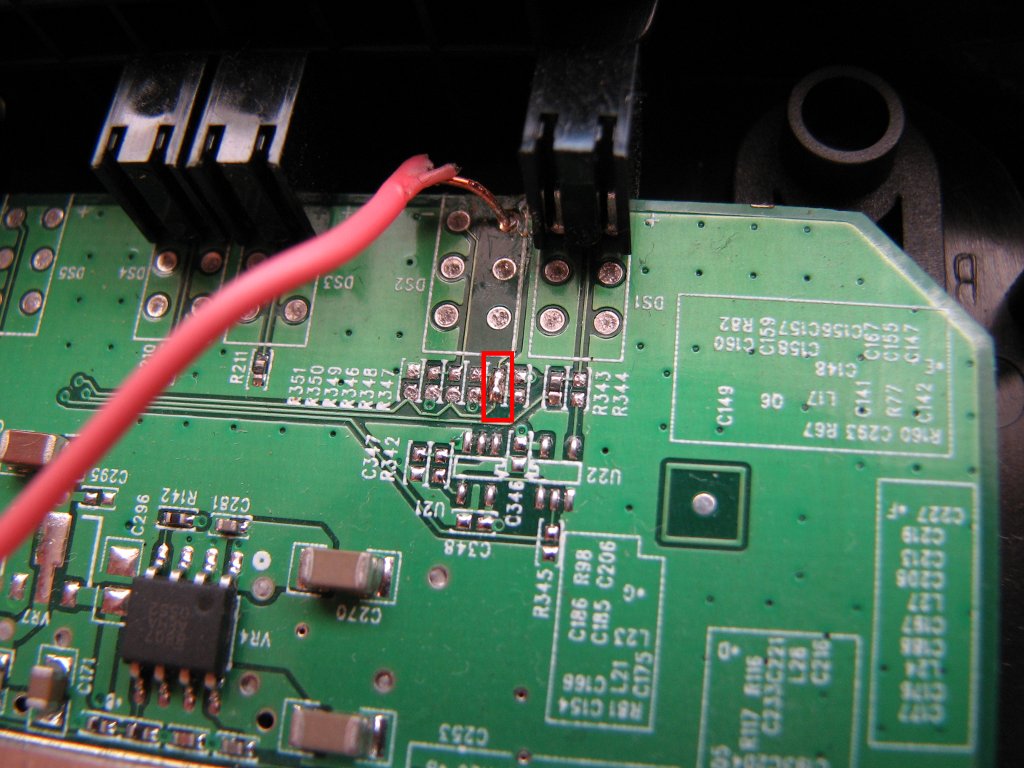 bigger size (1024 x 768) original camera size (large) |

gpioctl set 0After this I am able to use digitemp to measure the temperature:
root@OpenWrt:~# digitemp_DS9097 -a
DigiTemp v3.5.0 Copyright 1996-2007 by Brian C. Lane
GNU Public License v2.0 - http://www.digitemp.com
Jan 02 20:54:48 Sensor 0 C: 24.25 F: 75.65
OSWave RedBoot analyze (on Tonze AW-6660, 4MB flash)
After long period of running my SparkyTemp from TFTP + root over NFS, I've got occasion to test more deeply how OSWave and DD-WRT is using the flash. First I was testing Tonze AW-6660 with OSWave firmware loaded. I connected the console - this time I needed to set it as 115200 8N1 to have it working. After powering device up the terminal window show me the following:+Ethernet eth0: MAC address 00:0e:8e:7d:d8:4a IP: 192.168.1.7/255.255.255.0, Gateway: 192.168.1.1 Default server: 192.168.1.23 RedBoot(tm) bootstrap and debug environment. OSWAVE AR5312/AW bootloader: [ROM] Version 1.02 - built 13:09:08, May 5 2007 Copyright (C) 2007. RAM: 0x80000400-0x80ff0400, [0x80000400-0x80fe0400] available FLASH: 0xbfc00000 - 0xbffe0000, 64 blocks of 0x00010000 bytes each.I needed quickly press CTRL+C to have a RedBoot prompt:
^C
OsWave>
Let's see partition list:
OsWave> fis list
Name              FLASH addr  Mem addr    Length      Entry point
RedBoot           0xBFC00000  0xBFC00000  0x00030000  0x00000000
FIS directory     0xBFC30000  0xBFC30000  0x00010000  0x00000000
zImage            0xBFC50000  0xBFC50000  0x002D0000  0x80800000
Unfortunately this RedBoot is very limited version. I don't have nothing more then tftp protocol available for fetching data. Help command was not available. I was trying to pull my kernel image like this:
OsWave> load -r -b 0x80800000 -h 192.168.1.23 spark
Unable to reach host 192.168.1.23 (192.168.1.23)
Then I was also trying:
OsWave> load -r -b 0x80800000 spark
Using default protocol (TFTP)
TFTP timed out 1/15
Can't load 'spark': operation timed out
Now I think I know why it wasn't work (see below section about DD-WRT image and network) but it doesn't matter now because I prefer DD-WRT RedBoot because it has much better options available (eg. loading data via serial cable).
DD-WRT RedBoot analyze (on Tonze AW-6660, 4MB flash)
After short analyze of OSWave RedBoot the time has come to test the DD-WRT bootloader. Flashing from original firmware is done in two pass process. First I needed to load some Atheros image, which then allow to flash the device with proper DD-WRT image via FTP server. The method is described on DD-WRT. After this I've got fresh DD-WRT on Tonze AW-6660 :)I've connected the serial cable, powered the device up (also using 115200 8N1) and I can see the following:
Ethernet eth0: MAC address 00:0e:8e:7d:c0:95
IP: 192.168.1.1/255.255.255.0, Gateway: 0.0.0.0
Default server: 192.168.1.23

RedBoot(tm) bootstrap and debug environment [ROM]
production release, version "2.1.3" - built 21:21:29, Aug 27 2007

Platform: ap30 (Atheros WiSOC)
Copyright (C) 2000, 2001, 2002, 2003, 2004 Red Hat, Inc.
Copyright (C) 2007, NewMedia-NET GmbH.

Board: TW6600
RAM: 0x80000400-0x80ff0400, [0x80000400-0x80fd1400] available
FLASH: 0xbfc00000 - 0xbffe0000, 64 blocks of 0x00010000 bytes each.
== Executing boot script in 1.000 seconds - enter ^C to abort
Similar like before I needed to press CTRL+C (default timeout was 1 second) and I've got prompt:
^C
DD-WRT>
Partition list:
DD-WRT> fis list
Name              FLASH addr  Mem addr    Length      Entry point
RedBoot           0xBFC00000  0x80053000  0x00030000  0xBFC00000
rootfs            0xBFC30000  0x80100000  0x002A0000  0x80100000
linux             0xBFED0000  0x80100000  0x000C0000  0x80100000
mampf             0xBFF90000  0xBFF90000  0x00010000  0x00000000
nvram             0xBFFA0000  0xBFFA0000  0x00010000  0x00000000
RedBoot config    0xBFFC0000  0xBFFC0000  0x00001000  0x00000000
FIS directory     0xBFFD0000  0xBFFD0000  0x00010000  0x00000000
Surprise: I also had a help command available :)
DD-WRT> help Manage aliases kept in FLASH memory alias name [value] Set/Query the system console baud rate baudrate [-bFirstly I can't fetch images via ethernet. I quickly discovered that instead I can use zmodem or ymodem for kernel transfer into memory :)] Move Atheros Board Data information bdmove Restore Atheros Board Data information bdrestore Manage machine caches cache [ON | OFF] Display/switch console channel channel [-1| ] Compute a 32bit checksum [POSIX algorithm] for a range of memory cksum -b -l Display (hex dump) a range of memory dump -b [-l ] [-s] [-1|2|4] Execute an image exec [-b ] [-c "kernel command line"] [-w ] [ ] Manage FLASH images fis {cmds} Manage configuration kept in FLASH memory fconfig [-i] [-l] [-n] [-f] [-d] | [-d] nickname [value] Execute code at a location go [-w ] [-c] [-n] [entry] Help about help? help [ ] Display command history history Set/change IP addresses ip_address [-l [/ ]] [-h ] Load a file load [-r] [-v] [-d] [-h ] [-p ][-m ] [-c ] [-b ] list directory contents ls [-d directory] Compare two blocks of memory mcmp -s -d -l [-1|-2|-4] Copy memory from one address to another mcopy -s -d -l [-1|-2|-4] Fill a block of memory with a pattern mfill -b -l -p [-1|-2|-4] Mount file system mount [-d ] -t fstype Network connectivity test ping [-v] [-n ] [-l ] [-t ] [-r ] [-i ] -h Reset the system reset Unmount file system umount Display RedBoot version information version Display (hex dump) a range of memory x -b [-l ] [-s] [-1|2|4]
At the beginning I have some problems with loading the kernel because I can't exec it correctly, I always had the following info when I was trying to run loaded kernel:
DD-WRT> exec
Now booting linux kernel:
 Base address 0x80030000 Entry 0x80041000
 Cmdline :
** command abort - illegal memory access?
Then I figured out that when loading ELF I needed to load it without "-r" parameter (which enable ELF analyze).
Besides I also needed to set correct base address (.text section start address) which I obtained with the command (on the pc):
$ readelf -S ./bin/openwrt-atheros-vmlinux.elf
There are 22 section headers, starting at offset 0x2b5174:

Section Headers:
  [Nr] Name              Type            Addr     Off    Size   ES Flg Lk Inf Al
  [ 0]                   NULL            00000000 000000 000000 00      0   0  0
  [ 1] .text             PROGBITS        80041000 001000 236c0c 00  AX  0   0 32
  [ 2] __ex_table        PROGBITS        80277c10 237c10 0016e8 00   A  0   0  4
  [ 3] __dbe_table       PROGBITS        802792f8 2392f8 000030 00   A  0   0  4
  [ 4] .rodata           PROGBITS        8027a000 23a000 0324e8 00   A  0   0 32
  [ 5] .pci_fixup        PROGBITS        802ac4e8 26c4e8 0005c0 00   A  0   0  4
... and so on ...
After long tests I've got the final method for loading and booting openwrt-atheros-vmlinux.elf kernel via ymodem protocol:
load -m ymodem -b 0x80041000
exec
This ELF image is big and I also figured out the DD-WRT way of running lzma-compressed kernel which I applied to OpenWRT kernel. I've cd to kamikaze main dir, then checkout DD-WRTs LZMA kernel loader via svn:
svn co svn://svn.dd-wrt.com/DD-WRT/src/router/lzma-loader/aw6600Then I've changed the following line in Makefile to use correct tools path (it uses kamikaze r14600 paths, so maybe you need to adjust paths manualy if you're doing the same):
Index: Makefile
===================================================================
--- Makefile    (revision 15778)
+++ Makefile    (working copy)
@@ -5,7 +5,7 @@
 KERNEL_ENTRY := 0x80041000
 BOARD_DEFINE := AR531X

-CROSS_COMPILE = $(ARCH)-linux-
+CROSS_COMPILE = ../staging_dir/toolchain-mips_gcc-4.1.2_uClibc-0.9.29/usr/mips-openwrt-linux-uclibc/bin/

 OBJCOPY:= $(CROSS_COMPILE)objcopy
 CFLAGS := -fno-builtin -Os -G 0 -mno-abicalls -fno-pic -Wall -DKERNEL_ENTRY=${KERNEL_ENTRY} -DLOAD_TEXT_START=${LOAD_TEXT_START} -DRUN_TEXT_START=${RUN_TEXT_START} -D_LZMA_IN_CB -D${BOARD_DEFINE}
Then in aw6660 directory I created symlink to lzma kernel (copying should also do the trick):
cp ../bin/openwrt-atheros-vmlinux.lzma vmlinux.lzmaTyping make gives me the kernel with decompressor in place, it is amost ready. To finish I did:
../staging_dir/toolchain-mips_gcc-4.1.2_uClibc-0.9.29/usr/mips-openwrt-linux-uclibc/bin/objcopy -O binary ./lzma.elf lzma.outThe kernel is now ready in file lzma.out. It has LZMA decompresor "bundled in".
Loading this kernel is done like this (keep in mind different base address):
load -m ymodem -r -b 0x80100000After this when I executed the kernel, I was able to see decompression and running:
DD-WRT> exec
Now booting linux kernel:
 Base address 0x80030000 Entry 0x80100000
 Cmdline :
Atheros WiSOC DD-WRT LZMA Kernel Loader
decompressing...
done.
jump to kernel...
OK - now something that I've discovered at last: network access.
The RedBoot config is available using this command:
DD-WRT> fconfig -l -n
boot_script: true
boot_script_data:
.. fis load linux
.. exec

boot_script_timeout: 1
bootp: false
bootp_my_gateway_ip: 0.0.0.0
bootp_my_ip: 192.168.1.1
bootp_my_ip_mask: 255.255.255.0
bootp_server_ip: 192.168.1.23
console_baud_rate: 115200
gdb_port: 9000
info_console_force: false
net_debug: false
Above config is the default. I changed the timeout and net_debug values (every time I confirmed with 'y') with the following two commands:
fconfig net_debug true
fconfig boot_script_timeout 5
Then I restarted the device:
resetThis gives me two benefits: network access to the router (net_debug) and more time (5 secs instead of 1).
First time I was able to ping to/from the router!! :)
Turning on network debuging gives me network access (besides displaying raw ethernet packets displayed on console). As a result I have another possibility to access the bootloader: TCP 9000 debugging port.
To use it I've started continuous ping the sparklan on one terminal window, and on the second one (when I see ping replies on first) I've launched:
echo -e "\x3" | nc -w 1 -vvv 192.168.1.1 9000 ; telnet 192.168.1.1 9000After pressing Enter I was at bootloader prompt (without using serial cable) :)
Then I was trying to pull the kernel from TFTP - unfortunately - another problem occurs:
DD-WRT> load -b 0x80041000 spark
Using default protocol (TFTP)
Can't load 'spark': access violation
What the heck? access violation??!
OK, another try: loading via HTTP:
DD-WRT> load -r -m http -b 0x80100000 /lzma.out
Raw file loaded 0x80100000-0x801e0f07, assumed entry at 0x80100000
This time it worked, I was able to boot :)
Althought I didn't test it, it should be relative simple to make OpenWRT permanent using DD-WRT bootloader (fis init, load, etc.).
Making OpenWRT permanent
If you just want to know how to flash a RedBoot just scroll down to the end of this chapter. Below is described what I've done, what I screwed up and how I fixed it :)Tonze AW-6660 devices after tests goes back to the owner, and I decided to make additional tests with making OpenWRT permanent on my Sparklan WX-7800A. It even has only 2MB flash version. I started from original VxWorks firmware.
First I've configured the VxWorks bootloader to TFTP boot my OpenWRT image. I created full dump:
dd if=/dev/mtdblock0 of=mtdblock0.binThere was no RedBoot partitions defined so the mtdblock0 is the full flash image. My plan was to use dumped before (from Tonze) RedBoot and it's config, so I manually did the following on the copy of flash dump:
1. I put the DD-WRT RedBoot partition (0x30000 size) at the beginning of dumped image
2. I put the FIS Directory at the -0x1000 bytes from the end of image
3. I put the RedBoot config at the -0x2000 bytes from the end of image
This RedBoot is compiled with holding the FIS Directory at the erasesize block from the end, and config another block preceded it. Next I flashed the whole image back to the device:
dd if=mtdblock0_my.bin if=/dev/mtdblock0Ok - now the moment of truth - I set 115200 bps and made a reboot.
Ooops - console is empty. This time I was thinking that device is bricked. But I change port speed to 9600 baud and I've got the RedBoot !!! :). Ok - so far so good :)
+**Warning** FLASH configuration checksum error or invalid key
Use 'fconfig -i' to [re]initialize database
... waiting for BOOTP information
I pressed CTRL+C and got:
Can't get BOOTP info, using default IP address
Ethernet eth0: MAC address 0a:00:40:e6:ff:ff
IP: 192.168.1.1/255.255.255.0, Gateway: 0.0.0.0
Default server: 0.0.0.0

RedBoot(tm) bootstrap and debug environment [ROM]
production release, version "2.1.3" - built 21:21:29, Aug 27 2007

Platform: ap30 (Atheros WiSOC)
Copyright (C) 2000, 2001, 2002, 2003, 2004 Red Hat, Inc.
Copyright (C) 2007, NewMedia-NET GmbH.

Board: TW6600
RAM: 0x80000400-0x80ff0400, [0x80000400-0x80fd1400] available
FLASH: 0xbfc00000 - 0xbfde0000, 32 blocks of 0x00010000 bytes each.
DD-WRT>
So - the flash is detected properly as 2MB. I initialized FIS directory and configuration:
DD-WRT> fis init
About to initialize [format] FLASH image system - continue (y/n)? y
*** Initialize FLASH Image System
... Erase from 0xbfdd0000-0xbfde0000: .
... Program from 0x80fe0400-0x80ff0400 at 0xbfdd0000: .
DD-WRT> fis list
Name              FLASH addr  Mem addr    Length      Entry point
RedBoot           0xBFC00000  0xBFC00000  0x00030000  0x00000000
RedBoot config    0xBFDC0000  0xBFDC0000  0x00001000  0x00000000
FIS directory     0xBFDD0000  0xBFDD0000  0x00010000  0x00000000
DD-WRT> fconfig -i
Initialize non-volatile configuration - continue (y/n)? y
Run script at boot: false
Use BOOTP for network configuration: true
Default server IP address: 10.1.0.1
Console baud rate: 9600
GDB connection port: 9000
Force console for special debug messages: false
Network debug at boot time: false
Update RedBoot non-volatile configuration - continue (y/n)? y
... Erase from 0xbfdc0000-0xbfdc1000: .
... Program from 0x80fd3400-0x80fd4400 at 0xbfdc0000: .
Everything seems ok. It works even better then on Tonze (where I had to set up network_debug) to have network access. Here it works out of the box.
The problem with loading via TFTP unfortunately still exists:
DD-WRT> load -b 0x80041000 '/srv/tftp/spark'
Using default protocol (TFTP)
Can't load ''/srv/tftp/spark'': access violation
So it was a time for booting linux this time via HTTP:
Linux version 2.6.32.25 (manio@draco) (gcc version 4.3.3 (GCC) ) #1 Sun Nov 21 14:16:26 CET 2010
bootconsole [early0] enabled
CPU revision is: 00018009 (MIPS 4Kc)
Determined physical RAM map:
 memory: 01000000 @ 00000000 (usable)
Initrd not found or empty - disabling initrd
Zone PFN ranges:
  Normal   0x00000000 -> 0x00001000
Movable zone start PFN for each node
early_node_map[1] active PFN ranges
    0: 0x00000000 -> 0x00001000
Built 1 zonelists in Zone order, mobility grouping off.  Total pages: 4064
Kernel command line: console=ttyS0,9600 rootfstype=squashfs,jffs2
PID hash table entries: 64 (order: -4, 256 bytes)
Dentry cache hash table entries: 2048 (order: 1, 8192 bytes)
Inode-cache hash table entries: 1024 (order: 0, 4096 bytes)
Primary instruction cache 16kB, VIPT, 4-way, linesize 16 bytes.
Primary data cache 16kB, 4-way, VIPT, no aliases, linesize 16 bytes
Memory: 13412k/16384k available (1999k kernel code, 2972k reserved, 327k data, 132k init, 0k highmem)
Hierarchical RCU implementation.
NR_IRQS:128
console [ttyS0] enabled, bootconsole disabled
console [ttyS0] enabled, bootconsole disabled
Calibrating delay loop... 219.54 BogoMIPS (lpj=1097728)
Mount-cache hash table entries: 512
NET: Registered protocol family 16
bio: create slab  at 0
Switching to clocksource MIPS
NET: Registered protocol family 2
IP route cache hash table entries: 1024 (order: 0, 4096 bytes)
TCP established hash table entries: 512 (order: 0, 4096 bytes)
TCP bind hash table entries: 512 (order: -1, 2048 bytes)
TCP: Hash tables configured (established 512 bind 512)
TCP reno registered
NET: Registered protocol family 1
Data bus error, epc == 8004b900, ra == 80289554
Oops[#1]:
Cpu 0
$ 0   : 00000000 1000c000 00000001 be80f000
$ 4   : be7ff000 00000001 802a82a0 be7cf000
$ 8   : be810000 000000a5 0000005a 35333131
$12   : 80817968 80824048 80863ec8 80824158
$16   : 00000000 802a6f40 8028978c 00000000
$20   : 00000000 be800000 00000000 00000000
$24   : e2af4de8 80183f8c
$28   : 80818000 80819e50 00000000 80289554
Hi    : 00000000
Lo    : 2887fa00
epc   : 8004b900 0x8004b900
    Not tainted
ra    : 80289554 0x80289554
Status: 1000c003    KERNEL EXL IE
Cause : 1080481c
PrId  : 00018009 (MIPS 4Kc)
Modules linked in:
Process swapper (pid: 1, threadinfo=80818000, task=80817938, tls=00000000)
Stack : 80852380 80189324 80852438 00000000 00000000 802a6db0 802a6f40 8028978c
        00000000 00000000 00000000 80289c00 802a6dac 802a6f40 8028938c 00000000
        00000000 802a6db0 802a6f40 8028978c 00000000 802897b8 802a6f40 802941d8
        00000000 802a6da0 802a6dac 8004b300 80281440 00000080 80280000 00000000
        00000000 80091720 802a6cc4 80295d08 8027f1f0 802a6db0 802a6f40 00000000
        ...
Call Trace:[<80189324>] 0x80189324
[<8028978c>] 0x8028978c
[<80289c00>] 0x80289c00
[<8028938c>] 0x8028938c
[<8028978c>] 0x8028978c
[<802897b8>] 0x802897b8
[<802941d8>] 0x802941d8
[<8004b300>] 0x8004b300
[<80091720>] 0x80091720
[<80295d08>] 0x80295d08
[<8028733c>] 0x8028733c
[<8004da0c>] 0x8004da0c
[<8028726c>] 0x8028726c
[<8004d9fc>] 0x8004d9fc


Code: 0088102b  50400008  8cc20008 <9062007a> 544a0005  8cc20008  9062007b  50490001  acc30008
Disabling lock debugging due to kernel taint
AHB interrupt: PROCADDR=0x1e80f07a  PROC1=0x80000a06  DMAADDR=0x00000000  DMA1=0x00000000
Every kernel which I tried finally got Ooops :(After some digging I found out what I did wrong :) There are two blocks (0x2000 size) of BoardData at the end of flash. I mistakenly overwritten it when I was putting FIS Directory and FIS config. Moreover the RedBoot can show me that data, but cannot write it because it is telling me that it is out of flash. Fortunatelly I have that original data (doing copies is a good practice), but I needed to write it back again at the end of the flash and I cannot do it with RedBoot...
Now it's time to Quick-n-Dirty Hack (tm) which I figured out ;)
I had to run linux - and linux need BoardData which doesn't exists where it was looking for. So I build kernel with the following change:
--- kamikaze/build_dir/linux-atheros/linux-2.6.26.8/arch/mips/atheros/board.c.original  2010-11-19 09:49:49.000000000 +0100
+++ kamikaze/build_dir/linux-atheros/linux-2.6.26.8/arch/mips/atheros/board.c   2010-11-28 10:08:56.921956027 +0100
@@ -143,7 +143,8 @@
         * spiflash driver, accessing the mapped memory directly is no
         * longer safe */

-       bcfg = find_board_config(flash_limit, false);
+       //bcfg = find_board_config(flash_limit, false);
+       bcfg=0x80f00000;
        if (!bcfg)
                bcfg = find_board_config(flash_limit, true);
        if (!bcfg) {
So the kernel now will be searching the boarddata at hardcoded address 0x80f00000. So before loading a kernel I needed also
to load the boarddata at this address. The following three commands did the trick:DD-WRT> load -r -m http -b 0x80f00000 /boarddata Raw file loaded 0x80f00000-0x80f1ffff, assumed entry at 0x80f00000 DD-WRT> load -m http -b 0x80041000 /bf.elf Entry point: 0x80045650, address range: 0x80041000-0x802a7770 DD-WRT> execNow the kernel loaded successfully :) I have also the following:
Searching for RedBoot partition table in physmap-flash.0 at offset 0x1d0000
4 RedBoot partitions found on MTD device physmap-flash.0
Creating 4 MTD partitions on "physmap-flash.0":
0x00000000-0x00030000 : "RedBoot"
0x001c0000-0x001c1000 : "RedBoot config"
0x001d0000-0x001e0000 : "FIS directory"
0x001e0000-0x00200000 : "boardconfig"
Besides the known RedBoot partitions there is also mentioned boardconfig partition at the end (RedBoot doesn't show it), which I need to repair. I have the data so flashing back is as simple as:
dd if=boarddata of=/dev/mtdblock3Now I have it working back again. Also the redboot uses the proper MAC-address for the ethernet (before it used 0xFFs at the end). Kernels are working. Even OpenWRT svn version is now working (at the time of 28.10.2010) :)
Now I know: There should be enough to flash DD-WRT RedBoot at the beginning of flash. Then make a 'fconfig -i' and 'fis init' to initialize data. Creating linux and data partitions and flashing it should be simple now (when RedBoot is working).
Contact
Feel free to mail me if you have any information/suggestions:e-mail/jabber: manio@skyboo.net